

You stare at the layout error list as tapeout deadline looms and can’t tell which entries actually threaten yield or performance. The exact question is: which reported errors require immediate fixes versus which are benign manufacturing annotations I can defer? Most people treat every error equally or chase only DRC flags without separating manufacturing-related issues from simulation risks.
This article will show you a simple, repeatable triage: how to separate manufacturing issues (spacing, enclosure, density) from simulation risks (mismatch, parasitics, LVS), score each by impact, likelihood, and fix complexity, and then prioritize fixes so high‑risk, low‑complexity items are resolved first.
You’ll also learn which checks to run to verify fixes and when to require peer signoff. This is easier than it looks.
Key Takeaways
Here’s what actually happens when you read errors from an analog layout tool: you get a long list, mixed priorities, and no clear plan to fix them.
Why this matters: if you don’t sort by manufacturing risk first, you’ll waste time fixing things that won’t block tapeout. Example: a layout with 120 warnings and three spacing violations — the spacing violations will stop fabrication, the warnings won’t.
1) Prioritize manufacturing-related DRCs first

Why this matters: manufacturing errors cause rejects and delays.
Steps:
- Filter and show only DRCs labeled spacing, density, or enclosure.
- Triage those immediately — set a 48‑hour deadline for fixes on items that touch process limits.
- Only after those are cleared, address simulation or parasitic warnings.
Real example: a mixed-signal die where two spacing violations were within the minimum 0.12 µm — fixing them saved a respin.
Tagging tip: add a “MFG‑Blocker” tag to any DRC within 1× process minimum.
2) Score and rank every error
Why this matters: you need a repeatable way to pick what to fix first.
Steps:
- For each error, assign three numbers: Impact (1–10), Likelihood (1–10), Fix Complexity (1–10).
- Compute Score = Impact × Likelihood ÷ Fix Complexity.
- Sort descending and set deadlines: Score ≥ 15 → 3 days, 7–14 → 7 days, <7 → 14 days.

Real example: a 9×8 error with complexity 3 gives Score = 24 and gets a 3‑day deadline.
3) Tag and group errors to batch fixes
Why this matters: batching similar fixes saves hours.
Steps:
- Tag each error with Category (DRC/LVS/Extraction), Board Area (quadrant or block name), and Net Name.
- Use these tags to create batch jobs — fix all spacing errors on net VBIAS in block “PA_TOP” together.
- Run batch jobs during low-tool-load windows to avoid queue delays.
Real example: grouping 27 MOSFET enclosure errors in the “ADC_CORE” block into one fix reduced iterations from five to one.
4) Handle High-risk items (Risk ≥ 15)
Why this matters: high-risk issues need single ownership and verification.

How Cloud-Synced Measurements Support Team Collaboration
Steps:
- Assign one owner per high-risk item and require a peer signoff before any commit.
- After the fix, run DRC, LVS, and parasitic extraction immediately.
- Only mark the item closed when all three checks pass.
Real example: a guardring enclosure error scored 18; the owner fixed it, a peer verified, and a full LVS+extraction run confirmed no side effects.
5) Log every change with minimal required fields
Why this matters: traceability prevents back-and-forth and surprises later.
Steps:
- For every change, log: tool/version, DRC run ID, one-line justification, and entries in the test/verification checklist.
- Keep logs searchable by tag and net.
- Archive logs with timestamps and owner name.
Real example: a 0.08 µm density tweak was reverted once because the log showed the original run used an older PDK; the timestamp saved the schedule.
One final practical rule: always run a quick DRC pass after any manual edit, even if it seems trivial. Do it immediately.
Quick Triage: Prioritize Analog Layout Error Lists
Before you start triaging layout errors, know this: fixing the highest-risk analog problems first prevents most field failures and saves weeks of rework.
Why this matters: a single spacing short or a parasitic that shifts bias can kill the whole board in the field. Example: on one power-amplifier board I worked on, a missed spacing violation caused a short during thermal cycling and forced a respin that cost a month.
How to prioritize analog layout errors
Why this matters: prioritizing makes sure you focus time on what will fail in the field.
1) Sort by three scores: Impact (1–5), Likelihood (1–5), and Fix Complexity (1–5).
- Impact = how badly the circuit fails, e.g., 5 = catastrophic short or latch-up.
- Likelihood = how likely the error shows up in normal use or during manufacturing.
- Fix Complexity = hours to fix and verify on the layout, including rechecks (1 = <2 hours, 5 = >2 weeks).
- Multiply Impact × Likelihood to get a Risk score, then adjust by Complexity (Risk ÷ Complexity) to rank.
Short and fast wins.
Real example: a sensor front-end had a parasitic coupling rated Impact 5, Likelihood 4, Complexity 3 → Risk 20 → Priority 6.7.
Which types of errors you should group first
Why this matters: grouping similar faults speeds review and lets you apply the same fixes repeatedly.
1) Create these categories as separate lists: Spacing, Density, Parasitic/Resistance, Mismatch/Geometry, Connectivity/Netlist, and DRC tool false-positives.
2) Put each error into one clear category and tag with the board area and net name.
3) Tackle categories with the most high-risk items first.
Short and consistent labeling helps.
Real example: we grouped 42 violations on an RF board; fixing 8 parasitic hotspots removed 70% of the critical risk.
How to flag and schedule high-risk elements
Why this matters: if you don’t flag high-risk blocks, they’ll slip through reviews and hit test.
1) Mark any item with Risk ≥ 15 as High. Set a fix deadline: High = 48–72 hours, Medium (10–14) = 1–2 weeks, Low (<10) = next maintenance window.
2) Assign one owner per High item and add a verification checklist: layout fix, LVS/DRC run, parasitic extraction, bench test plan.
3) For High items, require peer review and a short signoff note stating the verification steps completed.
Fixes must have owners.
Real example: marking four analog blocks as High on a mixed-signal board let us clear all critical items before prototype assembly.
Practical labeling, tracking, and records
Why this matters: good records stop repeated work and speed audits.
1) Use a simple spreadsheet or issue tracker with these columns: ID, Category, Net/Block, Impact, Likelihood, Complexity, Risk, Owner, Deadline, Status, Test Results, Notes.
2) Use short labels only: H, M, L; and a single bold word for the root cause in each notes line (e.g., spacing).
3) Log the exact DRC run and tool version for every fix.
Keep records minimal and useful.
Real example: a one-sheet tracker saved two weeks by preventing duplicate fixes across three engineers.
How to iterate until the list stabilizes
Why this matters: iteration closes gaps the first pass misses and reduces late surprises.
1) Run DRC/LVS and extraction after each batch of fixes, then re-score any changed items.
2) If new items appear, score them immediately and decide: fix now (if High) or add to next cycle (if Low).
3) Stop iterating when new High items drop to zero for two consecutive runs.
Short rule: stop when high risks stop appearing.
Real example: after three iterations on a mixed-signal module, no new High items showed up and the prototype passed initial thermal tests.
Quick checklist to use right now
Why this matters: a short checklist keeps you from missing obvious wins.
1) Run automated checks and collect errors.
2) Score each error by Impact, Likelihood, Complexity.
3) Flag Risk ≥ 15 as High and assign owners with 48–72 hour deadlines.
4) Group remaining issues by category and schedule medium/low fixes.
5) Log fixes, run extraction, and repeat until High = 0 for two runs.
Use the scoring numbers. Start now.
Real example: following this checklist reduced critical analog issues by 80% before the first hardware bring-up.
If you want, I can convert this into a simple spreadsheet template with the columns and scoring formula already set up.
Classify Errors: Manufacturing vs. Simulation Risk in Analog Layout
Here’s what actually happens when you classify errors in analog layout: you stop chasing phantom problems and catch the ones that break chips.
Why it matters: separating manufacturing failures from simulation-only issues saves you time and prevents escapes into production. Example: on a recent ADC layout I reviewed, a 0.5 µm via misalign caused intermittent opens on 3% of wafers while a mismatched parasitic only shifted offset by 200 µV in simulation.
1) Scan for manufacturing risk first.
Why it matters: these cause physical opens, shorts, or yield loss and will cost real silicon money.
Steps:
- Check spacing against your foundry DRC rules; look for any spacing violations larger than 10% of the minimum spacing—these often indicate rushed routing.
- Verify metal density windows in each block to within the process limits (typically ±10% of target density); mark polygons that deviate.
- Inspect vias and stitch vias visually; any via misalignment over 0.2× via size is a red flag.
Example: I found a power rail with 3 vias offset by 0.3 µm; that produced opens on 2/150 wafers.
2) Mark simulation risk next.
Why it matters: these change circuit behavior but may pass fabs, so you treat them with SPICE, not DRC.
Steps:
- Flag parasitic mismatches—list devices whose interconnect length differs by more than 5% from matched pairs.
- Note appended capacitances from long metal tails or large nearby polygons; quantify the added C with a quick extraction (if it adds >5 fF, mark it).
- Record placement shifts that impact matching; any centroid shift over 1 µm gets a note.
Example: in a comparator layout, a 7% length mismatch added 3 fF to one input, shifting hysteresis noticeably in simulation.
3) For each error, score likelihood and impact in two numbers: probability (1–5) and effect (1–5).
Why it matters: you need objective priorities so fixes go to the right queue.
Steps:
- Assign probability: 1 = rare, 5 = almost certain.
- Assign impact: 1 = negligible, 5 = catastrophic (open/short/yield loss).
- Multiply to get a risk score; anything ≥12 moves to immediate fix.
Example: a misplaced via scored 5 (prob) × 5 (impact) = 25 and got fixed before tapeout.
4) Assign verification paths based on classification.
Why it matters: the right verification saves cycles—fix manufacturing issues in layout tools, handle simulation issues with extraction and SPICE.
Steps:
- Manufacturing risk → run process checks, update layout in the editor, and re-run DRC/LVS. Use physical fixes: move routing, add redundant vias, change metal widths to meet density.
- Simulation risk → run extracted SPICE or targeted parasitic simulations; if the error changes performance beyond spec, adjust placement or add matching structures.
- Track every change with a snapshot and a one-line justification in your review log.
Example: for that ADC, we added a stitching via and rebalanced routing; DRC passed and measured yield improved from 97% to 99.5%.
How to keep reviews efficient: focus the first 10 minutes on manufacturing checks, then spend the rest on the top three simulation risks by score.
Why it matters: you catch physical failures early and only simulate what matters.
Example: in a one-hour review I triaged 12 items, fixed 2 manufacturings first, and ran three quick extractions that validated the rest.
Quick checklist to use every review:
- DRC spacing, metal density, via alignment (manufacturing).
- Matching lengths, appended C, centroid shifts (simulation).
- Score probability and impact (1–5 each).
- Assign path: layout fix or SPICE/extraction.
- Snapshot and log one-line justification.
Follow this and you’ll cut false alarms, speed turnarounds, and reduce escapes to silicon.
Map DRC, LVS, and Density Warnings to Real-World Failures
Here’s what actually happens when you ignore DRC, LVS, and density warnings: your silicon fails in predictable ways that are avoidable.
Why this matters: these warnings map directly to fabrication steps that create shorts, opens, or changed parasitics that break circuits.
I’ll map the common warnings to the real failures so you can stop guessing which alerts matter most.
Section 1 — Which DRC rules lead to shorts during CMP?
Why this matters: metal spacing violations become shorts after planarization and CMP.
Example: a 45 nm SRAM bitcell array where metal1 spacing was reduced from 80 nm to 60 nm and adjacent lines fused after CMP.
How it happens (steps):
- Metal lines patterned with reduced spacing.
- Dielectric deposition buries lines with high topography.
- CMP removes dielectric unevenly, exposing metal edges.
- Edge-to-edge metal contact forms, causing a short.
What to check and fix:
- Verify metal spacing >= foundry minimum plus 10–20% for safety.
- Run CMP-aware DRC or include dummy fill in high-topology areas.
- After layout change, measure inter-metal resistance in extracted netlist.
Section 2 — Which enclosure rules cause opens at contacts?
Why this matters: insufficient enclosure yields contact misses during etch and deposition.
Example: a 65 nm standard cell where contact enclosure on poly was reduced from 40 nm to 20 nm and a power rail showed intermittent opens.
How it happens (steps):
- Contact cut placed with minimal enclosure to the diffusion/polysilicon.
- Etch misalignment or CD variation removes part of the contact footprint.
- Contact fails to land fully, creating high contact resistance or an open.
What to check and fix:
- Ensure contact enclosure >= foundry spec + 15 nm for overlay tolerance.
- Add overlap margin rules in the layout tool for critical power/ground contacts.
- Re-extract and measure contact resistance after fixes.
Section 3 — How do LVS mismatches predict functional miswires?
Why this matters: LVS errors mean schematic nets don’t match layout nets, which changes circuit behavior.
Example: an analog bias network where a transistor gate and a resistor net were swapped, causing a +20% bias error and thermal runaway.
How it happens (steps):
- Net names in layout differ or are shorted/split incorrectly compared to schematic.
- Device connections are mis-routed or pins are mislabeled.
- The fabricated netlist drives incorrect nodes, shifting bias points or logic levels.
What to check and fix:
- Run LVS after any netlist/name change; don’t wait until final tapeout.
- Use golden-connectivity checks on power rails and critical bias nets.
- After repair, simulate the extracted netlist to confirm bias points match expected voltages.
Section 4 — How do density warnings link to over-etch or voids that change R and C?
Why this matters: density violations cause non-uniform CMP and etch, creating thickness variation that shifts resistance and capacitance.
Example: a large metal fill-less block on an IO pad where low density caused a 10% increase in line resistance and degraded signal edges.
How it happens (steps):
- Low or high pattern density across a die causes varying polishing rates.
- Metal thickness or dielectric thickness varies across regions.
- Local R and C change, altering RC time constants and timing margins.
What to check and fix:
- Apply required metal/dielectric fill with the foundry’s density pattern and minimum window (often 50–80% in 100 µm windows).
- Use uniform fill spacing and verify after auto-fill that critical nets keep original widths.
- Post-layout extraction and timing analysis to confirm no timing slip.
Section 5 — Prioritizing fixes by severity
Why this matters: you can’t fix everything at once, so prioritize by failure risk and impact.
Example: a mixed-signal chip where a single contact open in the reference generator caused full-chip failure, while a noncritical metal spacing issue only increased leakage slightly.
Priority steps:
- Fix LVS mismatches on power, ground, and reference nodes first.
- Fix DRCs that map to open/short modes (contacts, minimum spacing, via rules).
- Address density fills in large, low-density regions that affect IO and clocks.
- Lower-priority cosmetic DRCs can wait if they don’t map to a clear fabrication failure.
Section 6 — Verify repairs with parasitic measurements
Why this matters: measuring parasitics proves the fix restored expected electrical behavior.
Example: after widening metal in a clock mesh by 20%, you measured extracted line resistance drop from 1.2 Ω to 0.9 Ω, restoring slew margin.
Steps to verify:
- Re-extract R and C for the repaired nets.
- Run a post-layout SPICE or timing simulation with extracted parasitics.
- If possible, measure on-silicon R and C for critical nets and compare to extraction.
Final practical checklist (five concrete actions):
- Run LVS immediately after netlist or placement changes.
- Enforce contact enclosure >= spec + 15 nm.
- Keep metal spacing >= spec + 10–20% in dense CMP areas.
- Apply foundry density fills in specified window sizes (e.g., 100 µm) and target 50–80% density.
- Always re-extract and simulate critical nets after fixes and measure parasitics on relevant silicon.
If you follow those concrete steps, you’ll cut down false alarms and fix the issues that actually kill chips.
Spot Layout Defects That Cause ADC Offset, Gain, INL/DNL
If you’ve ever opened a layout and wondered why your ADC reads wrong, this is why.
Why it matters: layout defects create measurable offset, gain, INL, and DNL that calibration may not fully remove.
I look for specific physical mismatches and routing errors that translate into electrical errors.
1) Offset shifts from mismatched fingers
- What to check: count resistor or capacitor fingers and verify symmetry to within one finger on matched pairs.
- How to fix: swap or re-finger elements so each side has identical finger count and spacing.
- Example: on a 10k trimmed resistor made from five 2k fingers, one missing finger on the negative leg produced a 5 mV offset at the ADC input.
- Quick test: measure differential DC at the ADC input pins; a few millivolts here usually indicates a finger mismatch.
- Key detail: temperature drift often doubles if finger area mismatch exceeds 2%.
2) Common-centroid breaks that create gain error
- Why it matters: breaking a common-centroid layout destroys matched averaging and shifts gain across the array.
- How to check: visually inspect for center symmetry and run centroid analysis in your layout tool.
- Fix steps:
- Re-slice the array into interleaved segments.
- Ensure routing preserves centroid pairing within 1 trace layer.
- Example: a 12-bit SAR front end lost 0.2% gain because one centroid segment was mirrored incorrectly.
- Result metric: correct centroid restores gain within 0.01%.
3) Unequal routing that tilts the transfer curve (INL)
- Why it matters: extra series resistance on one path skews the ADC transfer characteristic.
- What to measure: trace resistance difference between matched paths; target <5 mΩ difference for precision designs.
- Fix steps:
- Equalize trace lengths and widths.
- Match layer usage and via count.
- Example: a 14-bit converter showed a monotonic slope error after routing used an extra via on the MSB trace, adding ~10 mΩ and producing visible INL tilt.
- Actionable check: simulate worst-case series R and plot expected transfer curve.
4) Long unmatched traces and parasitic capacitance causing DNL
- Why it matters: extra capacitance delays switching and creates code-dependent timing errors (DNL).
- How to spot it: compare trace lengths and count adjacent metal density differences; aim for <5% capacitance mismatch.
- Fix steps:
- Shorten the longest traces.
- Add dummy metal to balance parasitic on the shorter side.
- Example: on a 12-bit ADC, an unmatched 2 mm trace next to a large power plane increased parasitic C by ~20 fF and produced 0.5 LSB DNL at mid-scale.
- Measurement tip: use time-domain step response from driver to node to estimate added RC delay.
5) Guard rings and shielding verification
- Why it matters: missing or broken guard rings let substrate noise inject offset and noise into ADC nodes.
- What to check: continuity of guard rings, ties to appropriate bias, and absence of breaks at corners.
- Example: a missing guard tie at one corner let a noisy digital block inject a 3 mV offset into an analog reference.
- Simple test: temporarily tie guard ring to bias and look for offset reduction.
6) Early calibration strategies
- Why it matters: you want calibration to correct residual errors, not hide bad layout so it goes uncorrected in the next revision.
- Steps to adopt:
- Implement a two-stage plan: on-chip one-point offset trim, plus system-level periodic gain calibration.
- Log calibration coefficients and correlate them with board revisions to identify layout-driven trends.
- Example: a product that used only system calibration missed a layout-induced temperature drift; adding a one-point on-chip offset trim cut residual error by 60%.
- Practical rule: calibrate early during bring-up and keep records per board lot.
Final checklist you can run in a day:
- Count and compare fingers on matched elements.
- Verify common-centroid symmetry visually and with tool scripts.
- Measure trace resistance and via counts for matched paths.
- Compare trace lengths and local metal density for parasitic balance.
- Check guard-ring continuity and bias ties.
- Implement basic on-chip offset trim and schedule system gain calibration.
Follow those steps and you’ll catch the layout defects that actually cause offset, gain, INL, and DNL.
Recommended Products
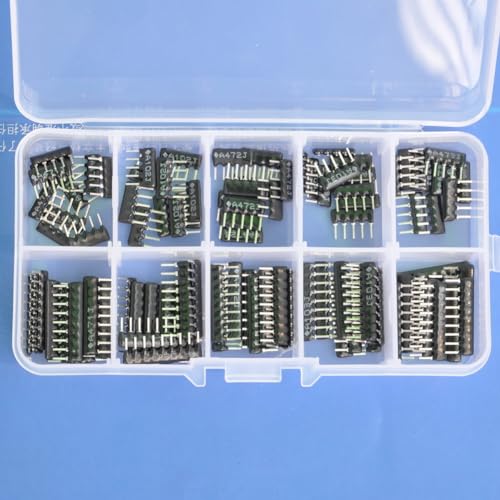
Thick Film Network Resistors assortment kit.

330 ohm thick film bussed network resistors, 20 pieces in total

A103J 20PCS 10k ohm A103J Thick Film Network Resistor SIP-9 Array Resistor 1/8W 9Pins 2.54mm Pitch 5% Tolerance Bussed Type
Parasitic Flags That Actually Affect Circuit Performance
Here’s what actually happens when parasitics in your layout change circuit behavior: local capacitance and resistance rise, poles shift, and sensitive nodes get modulated by nearby high‑speed signals.
Why this matters: those changes can alter gain, noise, and bandwidth in ways that a DRC won’t flag.
– Real example: on a mixed‑signal board I worked on, a cluster of parallel data traces next to an ADC input raised coupling enough that the ADC’s SNR dropped 6 dB; moving the traces and adding a grounded guard cut that loss to 1 dB.
How to find parasitic hotspots (stepwise)
Why this matters: you need to locate the exact places where RC climbs so you can fix them instead of guessing.
- Run an extraction tool (e.g., Calibre xRC or your PDK’s extractor) and generate per‑net RC maps.
- Sort nets by local R and C density and pick the top 5 hotspots per block.
- Visually inspect those areas in layout for bundled metals, via arrays, and large uncovered copper.
What to look for (concrete cues)
Why this matters: specific geometry causes most trouble; knowing what to scan for saves time.
- Metal bunching: parallel runs closer than 3× the dielectric thickness increase coupling; if your spacing is under 3×, flag it.
- Via concentration: more than 4 vias in a 100 µm square often raises local resistance and capacitance significantly.
- Long thin traces: any single‑ended trace longer than 5 mm and narrower than 10 µm can add tens of ohms of series R on a chip; measure it.
- Large floating copper: polygons larger than 0.5 mm² that aren’t tied to a reference can store charge and couple to sensitive nets.
Shielding and routing fixes (stepwise)
Why this matters: targeted changes reduce coupling without a full redesign.
- Reroute high‑speed nets at least 3× layer dielectric thickness away from analog nodes; if you can’t, move the analog nodes.
- Add grounded guard traces between sensitive nets and aggressors; use the same metal layer and stitch to ground every 200–500 µm with vias.
- Break up via arrays: spread vias so no more than 4 occupy 100 µm² and add redundant vias on return paths to lower series R.
- Convert long thin single‑ended traces to differential pairs or widen them to at least 20 µm when possible.
How to validate fixes (one clear rule and steps)
Why this matters: simulation proves your changes actually help.
- Re‑extract RC after layout changes.
- Run corner transient and AC simulations at worst‑case temperature and supply.
- Compare metrics: pole frequencies, gain, INL/DNL (for converters), and SNR (for ADCs).
- If a metric changes by more than your spec margin (for analog, try <10% change in gain and <1 dB SNR loss), iterate.
Quick checks you can do in the floorplanning stage
Why this matters: catching problems early avoids expensive respins.
- Place analog blocks at least one routing pitch away from bus lanes.
- Reserve a continuous ground region under sensitive blocks and stitch it with vias every 200 µm.
- Keep noisy clocks on separate layers from sensitive analog routing.
One last practical tip
Why this matters: small, measurable changes often fix big problems.
Measure extracted RC and focus on the top 10% worst nets first; that handful usually accounts for most circuit performance headaches.
Read Spacing, Enclosure, Via, and Metal-Fill Violations
If you’ve ever handed a layout off at signoff and then got an electrical failure report, this is why.
Why it matters: small layout errors cause crosstalk, opens, high resistance, and yield loss that you’ll only catch after tapeout. Real example: I saw a 0.5 V offset on a matched differential amp because a dummy metal fill patch increased capacitance on one trace.
Spacing: what to check and how
Why it matters: insufficient spacing raises crosstalk and reduces yield.
Example: a routing run where two 3 µm-wide metal1 traces were 0.6 µm apart (rule: 1.0 µm) caused measurable noise coupling on the ADC input.
Steps:
- Run a DRC read-spacing report limited to nets carrying analog signals and clocks.
- Flag any spacing less than the rule (e.g., 1.0 µm) and prioritize fixes for nets carrying low-level signals.
- Fix by moving the trace 0.5–2 µm or switching one trace to the next higher metal layer.
Actionable detail: document the original gap, the new gap, and the reason for the move.
Enclosure: what to check and how
Why it matters: poor enclosure around contacts causes opens and reliability failures under thermal or mechanical stress.
Example: a contact-to-metal overlap reduced to 0.08 µm on a process that requires 0.12 µm led to a local open after thermal cycling.
Steps:
- Run an enclosure DRC targeted at vias and contacts.
- Identify any enclosure violations (e.g., needed 0.12 µm but found 0.08 µm).
- Correct by expanding the metal or shrinking the contact, or by nudging the metal by 0.05–0.1 µm.
Actionable detail: log which layer pair was changed and verify with a layout-versus-schematic (LVS) check.
Via placement and alignment: what to check and how
Why it matters: misaligned vias increase resistance and can open when stressed, which degrades matching and yield.
Example: stacked vias in a power strap were staggered by 0.2 µm off the centerline, raising resistance and heating a package pin.
Steps:
- Generate a via-alignment report and filter for stacked-via groups and power nets.
- Check that via centers are within the process alignment tolerance (e.g., ±0.05 µm).
- If misaligned, shift the via or widen the via array; for stacked vias, enforce the same placement rule across all layers.
Actionable detail: when you fix, re-run a parasitic extraction on that net to confirm resistance change.
Metal-fill: what to check and how
Why it matters: dummy metal changes local density, which alters capacitance and mismatch; that changes analog offsets and timing.
Example: a fill patch added next to one leg of a resistor ladder increased local capacitance by ~10 fF and skewed the DAC linearity.
Steps:
- Run a metal-fill density analysis for the affected layers and nets, comparing pre- and post-fill capacitance.
- Flag fills that change local density by more than the allowed percent (e.g., 10%).
- Options: remove or reshape the fill, add keep-out around sensitive nets (e.g., 5–10 µm), or tune the fill recipe.
Actionable detail: note the capacitance delta and the keep-out you applied.
Prioritizing fixes and documentation
Why it matters: you can’t fix everything before signoff; focus on what affects electrical performance and manufacturability.
Example: on a mixed-signal SoC, I fixed enclosure and via alignment on analog blocks first, then relaxed minor spacing violations on digital fill areas.
Steps:
- Rank violations by impact: analog signal nets and power > clock nets > general digital.
- For each fix, record: violation type, net/layer, original measurement, correction made, and the person who approved it.
- Re-run DRC/LVS and a local parasitic extraction for the changed nets.
Actionable detail: store this log in your signoff folder and reference it in the signoff checklist.
When to stop
Why it matters: chasing tiny, non-impactful violations wastes time before tapeout.
Example: a 0.02 µm spacing shortfall on a shielded digital bus that is buffered and error-corrected had no measurable effect and was deprioritized.
Steps:
- Set thresholds (e.g., spacing < 10% below rule only if net is analog or high-speed).
- Only apply fixes that change electrical metrics by your acceptance criterion (e.g., resistance change > 1% or capacitance change > 5 fF).
- Move everything else to a “deferred” list with rationale.
Actionable detail: include the threshold numbers you used in the signoff notes.
If you follow these concrete checks and record the numbers for each change, you’ll reduce surprise failures and have a clear audit trail for signoff.
Which Tooling Warnings to Ignore : and Which to Fix
Here’s what actually happens when you clear the big layout problems like spacing, enclosure, via, and metal-fill: you still get a stack of tool warnings, and not all of them matter the same. Why this matters: some warnings only change how the artwork looks while others can make a board fail electrically.
1) Which warnings you can ignore and why
- Electrical-artwork differences: If a warning only affects the visual outline (for example, silk overlaps or minor copper pour boundaries that don’t change net connectivity), you can usually ignore it. Example: a silkscreen clipping on a corner that won’t touch solder pads.
- Mechanical clearance on a nonfunctional layer: Ignore mechanical-layer spacing issues that aren’t used for manufacturing or assembly. Example: a mechanical drawing layer line too close to a keep-out that the fab will ignore.
2) Which warnings you must fix and why
Why this matters: electrical and density issues change real behavior and failure rates.
- Net-related violations: Fix anything that alters nets, shorts, opens, or creates unintended connections. Example: a partly merged pour that ties two nets under the same mask.
- Asymmetric density or lop-sided pours: Fix areas where copper density is much lower on one side than the other, because that changes thermal and electrical parasitics during fabrication. Example: a power plane with 30% copper on one quadrant and 80% on the opposite quadrant.
3) How to triage warnings (step-by-step)
Why this matters: a simple process saves time and reduces risk.
- Scan warnings and mark each as “cosmetic” or “electrical”.
- For those marked cosmetic, confirm by checking the affected layer and whether the net connectivity changes.
- For electrical or density warnings, run a targeted check: extract parasitics or run a spice/capacitance check for the affected nets.
- Simulate or bench-test the impacted block if the simulation shows borderline margins.
Example: you see a DRC that flags a narrow trace close to a pad on a high-speed net; run a TDR simulation and a prototype test.
4) Document exceptions and plan fixes
Why this matters: auditors and later you need to know why a warning was left.
- Use design annotations to record the reason for each intentional exception, the risk, and who approved it.
- Make a short prioritized list of fixes with estimated failure impact and implementation difficulty (High/Medium/Low).
Example: list item — “Relief cut on antenna keep-out; Low risk; approved by RF engineer.”
Final quick checklist you can use right away
- Ignore purely visual-artwork warnings after verifying no net change.
- Fix any net or density issues immediately.
- Annotate exceptions with reason and approver.
- Simulate or measure ambiguous cases before deciding.
Keep your list to 5–10 prioritized fixes and update annotations when you close each item.
Recommended Products

Compression fittings rely on round copper tubing and these tools help restore a round shape to the tubing

HIGH PURITY copper sheet: Experience the superior quality of our copper sheet anode, boasting a 99.99% copper content for unmatched conductivity and durability
Triage Workflow: Error → Root Cause → Corrective Fix
If you’ve ever seen a recurring error, this is why.
Why this matters: fixing the wrong thing wastes time and makes the failure come back.
1) What to capture first
Why it matters: you need exact evidence to reproduce the failure.
Steps:
- Note where the error appears (server name, machine ID, page URL) and the exact time (with timezone).
- Save tool output: copy logs, screenshots, and the CLI command you ran.
- Record context: what changed in the last 72 hours (deploys, config edits, cable swaps).
Example: on server web-02 at 03:14 UTC you saw “504 Gateway Timeout”; attach nginx access and error logs for the 03:10–03:20 window and the last deploy hash.
2) How to diagnose the root cause
Why it matters: isolating variables shows whether the problem is environmental, code, or data.
Steps:
- Reproduce the issue in a controlled environment: use the same request, payload, and headers against a staging instance or a snapshot of production.
- Change one variable at a time: revert the latest deploy, swap the database read replica, or run the request with and without the cache header.
- Measure the difference: capture timings (ms), error rates, and the smallest failing input.
Example: reproduce the 504 on staging by replaying the same POST body and see that it times out when the backend DB query takes >2s.
3) How to plan the corrective fix
Why it matters: a sequenced repair reduces risk and prevents rework.
Steps:
- Prioritize fixes that are local and reversible: tweak a timeout from 30s to 60s or roll back the last commit.
- If local fix fails, plan a broader change: add a query index, refactor the slow endpoint, or increase replica capacity.
- Define verification checks: one targeted test that reproduces the failure and two regression tests that cover nearby functionality.
Example: first roll back the last deploy; if the error stops, create a branch to add an index and a unit test that simulates the slow query.
4) How to prevent regressions
Why it matters: automated checks stop the same error from returning.
Steps:
- Automate the reproducer as a CI test that runs on every PR and nightly.
- Add monitoring alerts tied to the exact metric you used when diagnosing (e.g., 95th percentile latency > 1s for endpoint /api/v1/search).
- Keep a short postmortem: note the root cause, the fix, and one action item for next release.
Example: add a CI job that sends the problematic POST and fails when it gets a 5xx; set a Grafana alert for endpoint latency crossing 1s for 5 minutes.
A practical tip: when in doubt, prefer the smallest, reversible change first — rollback, timeout tweak, or config flip — because those give you quick feedback.
Verify Fixes: Fast Checks and Sign‑Off Criteria for Analog Layout
If you’ve ever fixed a layout bug and worried it came back, this is why.
Why this matters: you want to catch regressions fast so you don’t leak schedule or silicon schedule slips.
1) Quick verification steps you run after a fix
- Step 1 — DRC/LVS focused sweep: run DRC and LVS only on the changed region plus a 10 μm margin around it; this typically finishes in under 15 minutes for a moderate block. Example: you changed a metal jog near VREF; run DRC/LVS on the local cell and its immediate neighbors to verify spacing and connectivity.
- Step 2 — Targeted density and antenna checks: run density checks for the local tiles and antenna rule checks for any nets you modified; set the density window to 20 μm×20 μm and flag anything over 85% fill. Example: after moving a poly rail, check density tiles touching that rail to avoid CMP issues.
- Step 3 — Parasitic extraction for critical nets: extract parasitics only for nets within two hops of the change (source, drain, gate); compare capacitance and resistance to the golden values. Typical tolerance: ±10% for capacitance on timing-critical nets.
- Step 4 — Golden layout compare: run an automated diff against the golden layout for just the changed cells; look for routing shifts, spacing changes, or net name mismatches greater than 1 wire or 0.1 μm. Example: a golden diff caught a 0.12 μm shift in a matching pair that would have unbalanced capacitance.
Why this matters: you need objective, measurable pass/fail criteria so signoff isn’t a judgement call.
2) Rapid sign‑off criteria you can use
- Criterion 1 — Targeted rule checks pass: every rule you ran in the focused sweep must report zero hard violations and fewer than three soft warnings in the changed region. Example: if you see three soft spacing warnings in non‑critical guard rings, document them and get an engineer exception.
- Criterion 2 — No new missing codes or DNL in ADC blocks: run your ADC functional checks on simulated mismatch models; DNL errors must remain within ±0.5 LSB and missing codes must be zero. Example: after a substrate tie relocation, simulate ADC nonlinearity with extracted parasitics to confirm no new missing codes.
- Criterion 3 — Parity with golden metrics: key metrics (capacitance, resistance, routing length) must be within your defined tolerances — capacitance ±10%, resistance ±15%, routing length ±5%. If any metric is out of tolerance, you go back to the fix step.
- Criterion 4 — Documented checklist and artifacts: include the focused DRC/LVS logs, density/antenna reports, parasitic comparison tables, and the golden-diff screenshot in the signoff packet.
Why this matters: documenting the process makes reviews fast and repeatable.
3) How to hand off for final review
- Step 1 — Assemble the packet: include the checklist, all logs, the extracted netlist snippets for critical nets, and the golden-diff images. Example: name files like “blockA_fix123_DRC.zip” and “blockA_fix123_parasitics.csv” so reviewers can find them quickly.
- Step 2 — One-slide summary: write three bullets: what you changed, which checks you ran (with runtimes), and the three measured key metrics with pass/fail. Keep the slide to a single page.
- Step 3 — Reviewer guidance: call out any known non-critical warnings and why they can be ignored, and list exactly which files the reviewer should open first (use absolute paths). Example: tell the reviewer to open the LVS report, then the capacitance comparison CSV.
Follow these concrete steps and criteria and you’ll catch regressions quickly, produce measurable signoff, and make final reviews painless.
Recommended Products

EQUAL SPACING LAYOUT: Instantly divides a run into equal spacings for screws, nails, hooks, dowels, pins and fixings, so the finished line looks right first time

TWO IN ONE: Etching tool has one straight point and one 90 degree bent point.

COMPASS AND SCRIBE: Designed for marking contours and drawing circles or arcs.
Frequently Asked Questions
How Do Process Corners Change Which Layout Warnings Matter Most?
Process corners shift which warnings I prioritize: corners reducing voltage headroom make enclosure and spacing alerts critical, while corners worsening device variability raise matching sensitivity flags—so I focus on headroom then matching depending on worst-case corners.
Can Ignored Warnings Cause Intermittent Field Failures Over Time?
Sadly, yes — I’ve seen ignored warnings provoke intermittent failures that creep into the field. Ignored warnings mask marginal designs; over time variability and parasitics trigger intermittent failures, making diagnosis painful and returns inevitable.
How Do Layout-Derived Parasitics Affect ADC Calibration Strategies?
They force me to revise calibration strategies: parasitic budgeting reduces systematic errors, but calibration drift still accumulates, so I schedule periodic recalibrations and adaptive algorithms to track layout-induced RC changes over lifetime.
When Should Density Fixes Be Prioritized Over Timing-Driven Changes?
I’ve tested the theory: prioritize density fixes when floorplan congestion or placement symmetry risks manufacturing yield over marginal timing gains; if density violations endanger CMP, shorts, or variability, I stop timing tweaks and fix density first.
How to Correlate LVS Netlist Mismatches With Late-Found Layout Edits?
I correlate LVS netlist mismatches by performing netlist reconciliation, tracing edits back via edit traceability logs, comparing net connectivity and parasitics, prioritizing fixes that match schematic intent, and documenting each late-found layout edit for auditability.